Blog6 min read
DORI and pixels per metre: CCTV design explained
What DORI means, the pixel densities for detect, observe, recognise and identify, how to calculate pixels per metre, and worked distances for common cameras.

Arthbot team
Arthbot Systems, Haridwar
On this page
"Can this camera see a face at 20 metres?" is the question behind every CCTV design. DORI and pixels per metre are how integrators answer it with numbers instead of guesses — and how buyers check that a design will deliver what it promises.
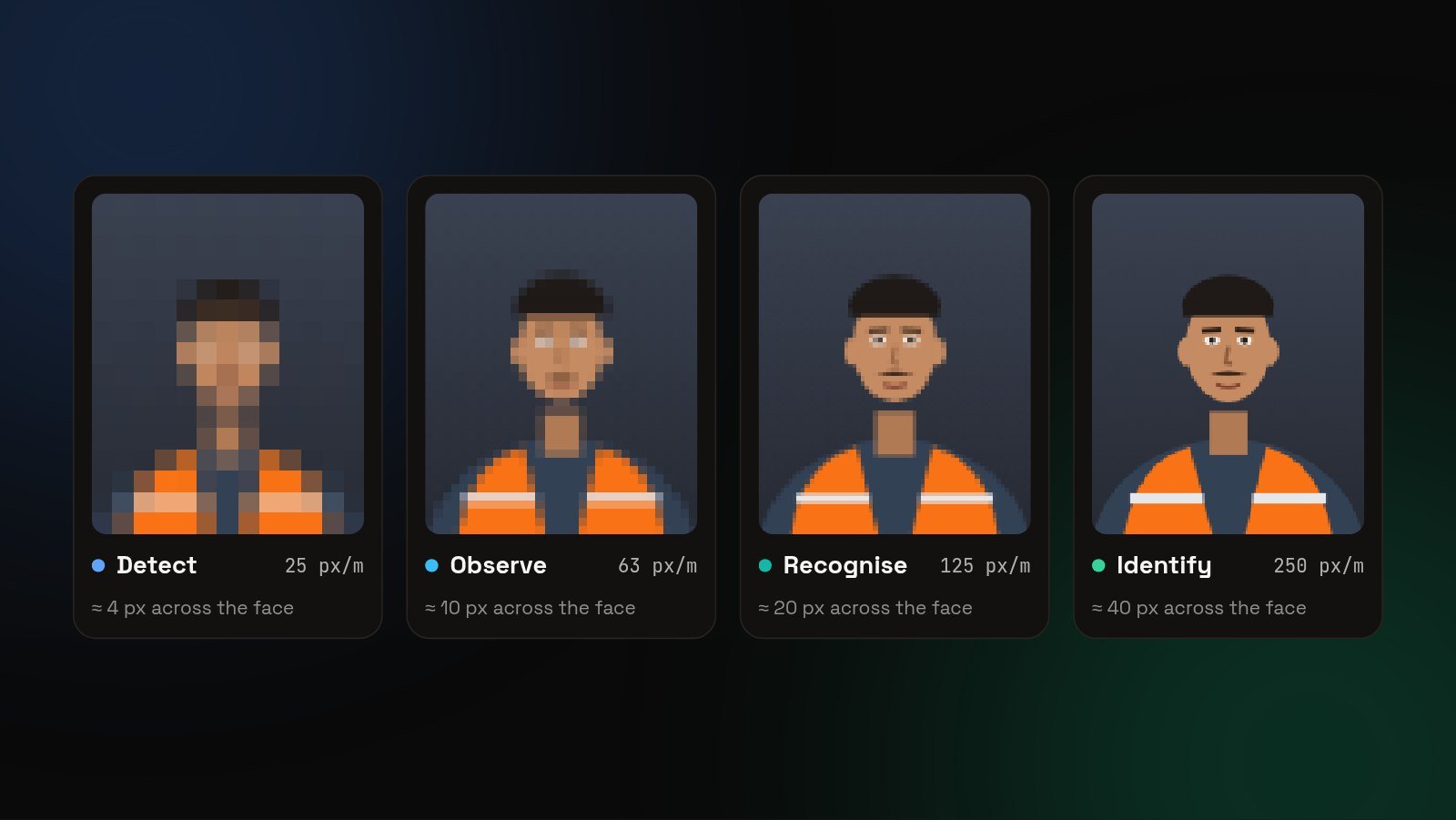
Quick answer DORI stands for Detect, Observe, Recognise, Identify — four levels of detail defined in the CCTV standard IEC 62676-4. Each needs a minimum pixel density on the target: 25 px/m to detect a person, 63 px/m to observe what they're doing, 125 px/m to recognise someone you know, and 250 px/m to identify a stranger. Pixels per metre = the camera's horizontal pixels ÷ the width of the scene in metres at the target's distance.
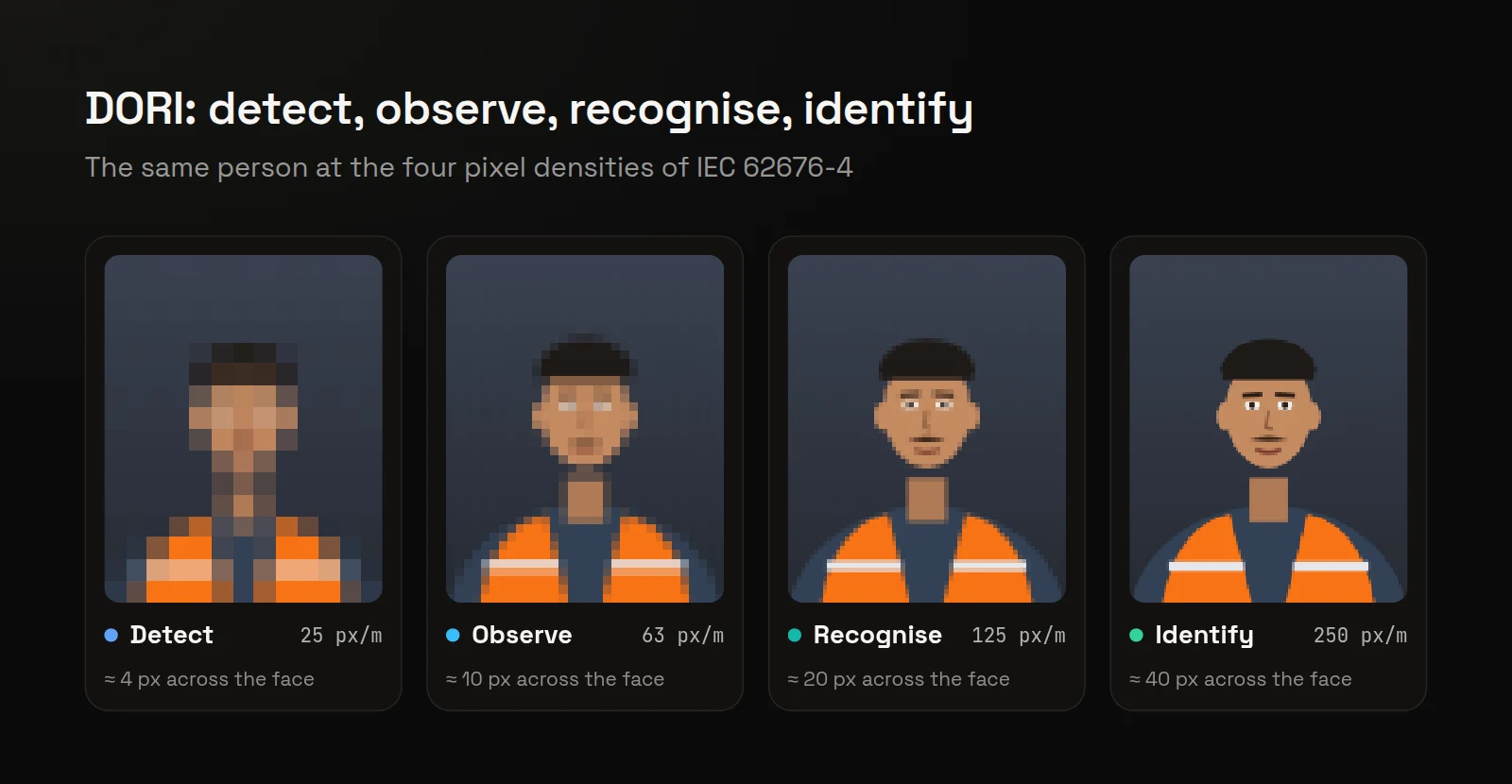
The four DORI levels
| Level | Pixels per metre | Pixels across a face | What you can do |
|---|---|---|---|
| Detect | 25 px/m | about 4 | See that a person or vehicle is there |
| Observe | 63 px/m | about 10 | See what someone is doing, clothing, direction |
| Recognise | 125 px/m | about 20 | Tell whether it's someone you already know |
| Identify | 250 px/m | about 40 | Identify a stranger beyond reasonable doubt |
These values come from IEC 62676-4:2014 and assume a face about 16 cm wide. Axis's white paper on pixel density is a good reference. A 2025 edition of the standard introduced new terms and levels, but DORI is still what most camera datasheets quote.
The standard also defines a monitor level (about 12.5 px/m, crowd and traffic flow) and an inspect level (about 1,000 px/m, fine detail), which come up less often.
How to calculate pixels per metre
Pixel density depends on three things: the camera's horizontal resolution, the lens's horizontal field of view, and how far away the target is.
Scene width (m)   = 2 × distance × tan(horizontal field of view ÷ 2)
Pixels per metre  = horizontal pixels ÷ scene width
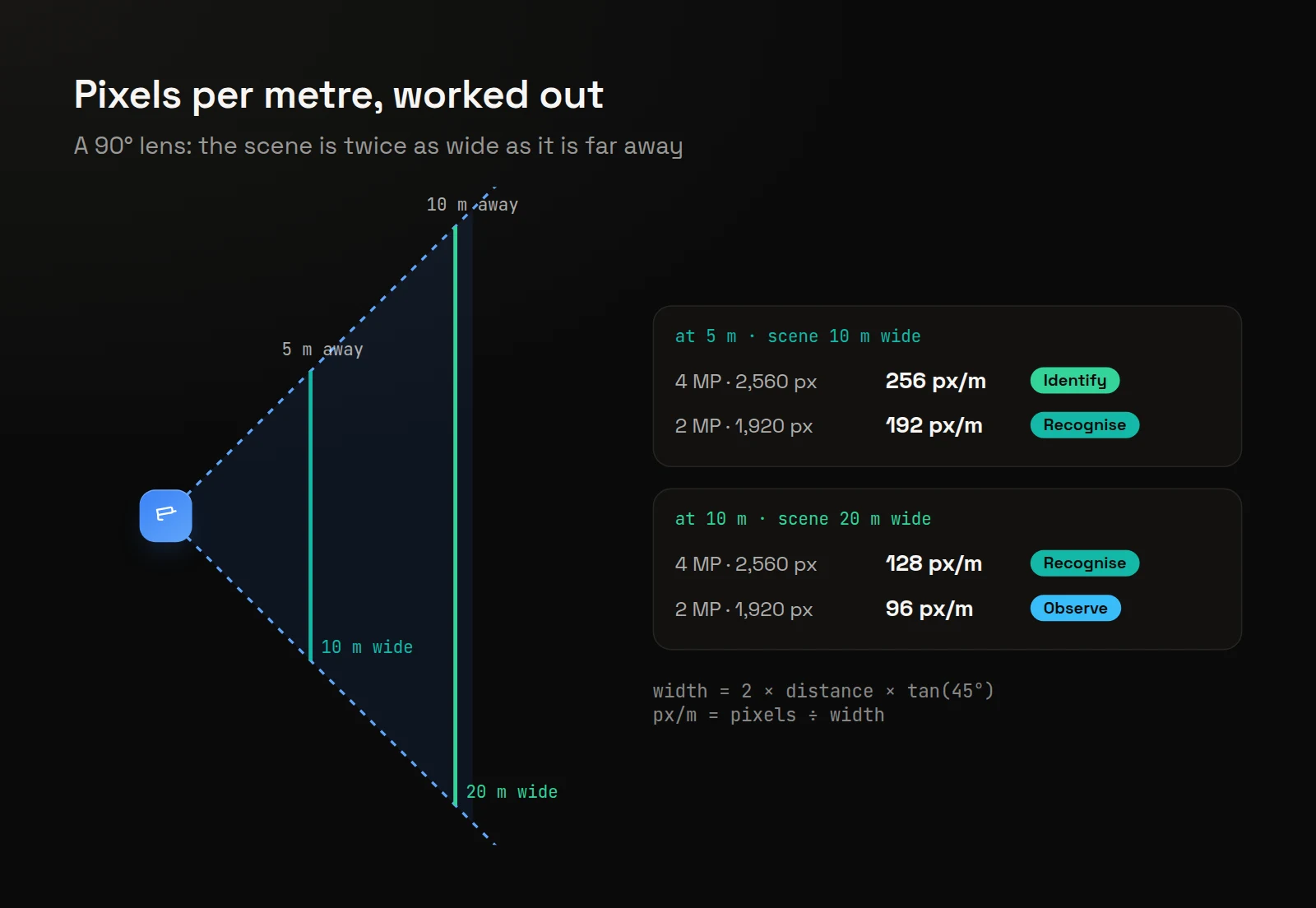
Worked example A 4 MP camera (2,560 × 1,440) with a 90° lens. At 10 m the scene is 2 × 10 × tan(45°) = 20 m wide, so pixel density is 2,560 ÷ 20 = 128 px/m — just enough to recognise. A 2 MP camera in the same spot gives 1,920 ÷ 20 = 96 px/m: observe, not recognise.
Turned around, the formula gives the furthest distance at which a camera reaches each level:
Maximum distance = horizontal pixels ÷ (pixel density × 2 × tan(field of view ÷ 2))
DORI distances for common cameras
Maximum distance in metres, for a wide (90°) and a narrow (40°) horizontal field of view:
| Camera | Lens | Detect | Observe | Recognise | Identify |
|---|---|---|---|---|---|
| 2 MP (1920 px) | 90° | 38 m | 15 m | 7.7 m | 3.8 m |
| 2 MP (1920 px) | 40° | 105 m | 42 m | 21 m | 10.6 m |
| 4 MP (2560 px) | 90° | 51 m | 20 m | 10.2 m | 5.1 m |
| 4 MP (2560 px) | 40° | 140 m | 56 m | 28 m | 14 m |
| 8 MP (3840 px) | 90° | 77 m | 30 m | 15 m | 7.7 m |
| 8 MP (3840 px) | 40° | 211 m | 84 m | 42 m | 21 m |
Two lessons jump out. A wide-angle camera can only identify people close to it — a few metres — so identification needs dedicated cameras at doors and gates. And a narrower lens buys far more distance than a higher resolution: a 2 MP camera with a 40° lens out-ranges an 8 MP camera with a 90° lens.
Note Datasheet DORI distances assume perfect conditions: in focus, good light, a target facing the camera, no compression loss. At night on infrared, in rain, or with heavy compression, real-world distances are shorter. Design with margin — or check against a real image from site.
DORI for AI video analytics
DORI was written for human operators watching a screen. AI analytics has its own needs, and they don't map one-to-one:
| Task | Typical need | Notes |
|---|---|---|
| Person and vehicle detection, intrusion, counting | Around detect–observe level | AI detects people reliably at lower densities than a human operator needs |
| PPE detection (helmets, vests) | Observe across the area, recognise at entries | Small items need more pixels — see PPE compliance |
| Number plate recognition (ANPR) | About 300 px/m (150 px across a 50 cm plate) | See how ANPR works |
| Face recognition | Identify level, faces towards the camera | Placement matters as much as pixels |
Frame rate, shutter speed and lighting matter too: a fast-moving target needs a fast shutter to avoid blur, however many pixels it has.
Putting DORI into a design
- Write the requirement per area, not per site: "identify at the main gate, recognise in the lobby, observe in the yard, detect along the fence."
- Pick camera, lens and position to meet each requirement at the furthest point that matters, using the formula above.
- Check the angle. Identify and recognise need a face, so mount cameras at a shallow angle (under about 30° down) at doors and gates, not high in a corner.
- Size the rest — storage, servers, GPUs and bandwidth — with our hardware sizing calculator.
- Verify on site with a test image at the critical distance before signing off.
Arthbot works with integrators on AI-ready CCTV designs for factories, warehouses, campuses and cities, with Arthview™ VMS and 40 AI applications on the cameras you specify. To partner with us on a project, get in touch.
Frequently asked questions
What does DORI mean in CCTV?
DORI stands for Detect, Observe, Recognise and Identify — four levels of image detail defined in IEC 62676-4. Each corresponds to a minimum pixel density on the target: 25, 63, 125 and 250 pixels per metre.
How do you calculate pixels per metre?
Divide the camera's horizontal resolution in pixels by the width of the scene in metres at the target's distance. Scene width is 2 × distance × tan(half the horizontal field of view).
How many pixels per metre do you need to identify a person?
About 250 pixels per metre, or roughly 40 pixels across the face, according to IEC 62676-4. Recognising someone you already know needs about 125 px/m.
How far can a CCTV camera identify a face?
It depends on resolution and lens. A 4 MP camera with a 90° lens reaches identification level only out to about 5 metres; with a 40° lens, about 14 metres. Real-world distances are shorter at night or in poor light.
Are DORI distances on datasheets accurate?
They're calculated for ideal conditions. Real distances are often shorter because of focus, lighting, infrared at night, compression and the target's angle, so design with a margin and verify with a test image on site.
- DORI
- pixel density
- CCTV design
- system integrators
- camera selection
See it on your own cameras
Send us a few minutes of your footage and we'll show you what Arthbot finds in it.