Blog7 min read
AI CCTV camera or AI software: which should you buy?
Edge AI cameras vs AI video analytics on a server: what each can detect, how they scale, what hardware you need, and when a mix of both makes sense.

Arthbot team
Arthbot Systems, Haridwar
On this page
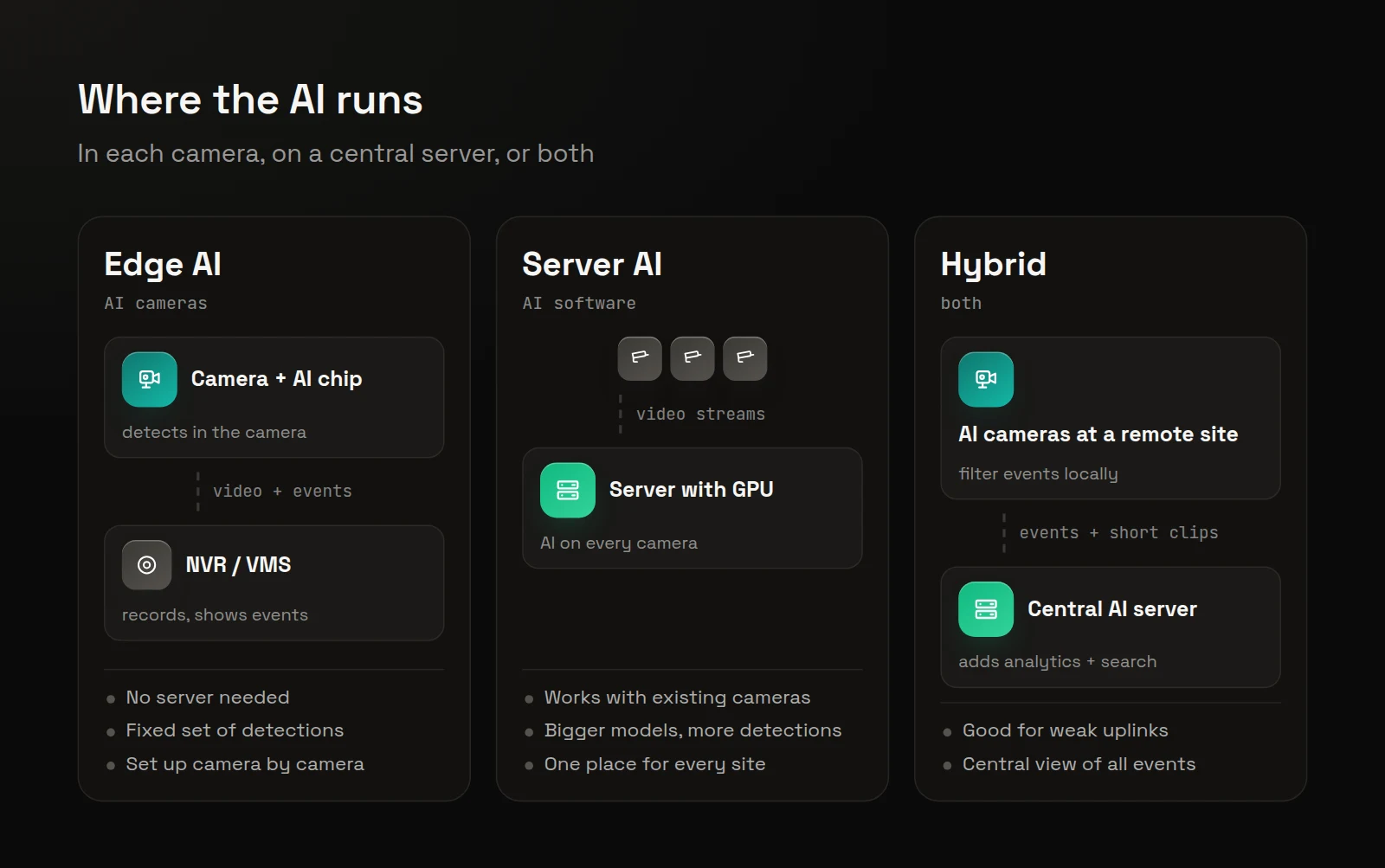
There are two ways to add AI to CCTV: buy cameras with AI built in, or run AI software on the video from the cameras you already have. Both work. They suit different sites, budgets and ambitions.
Quick answer AI cameras (edge AI) analyse video inside the camera. They're good for a few standard detections — line crossing, intrusion, people and vehicles — on new installations. AI software (server AI) analyses streams from any camera on a central server with a GPU. It's better when you have existing cameras, many sites, or need more advanced detections, one place to manage everything and search across all video. Many sites use both.
What is an AI CCTV camera?
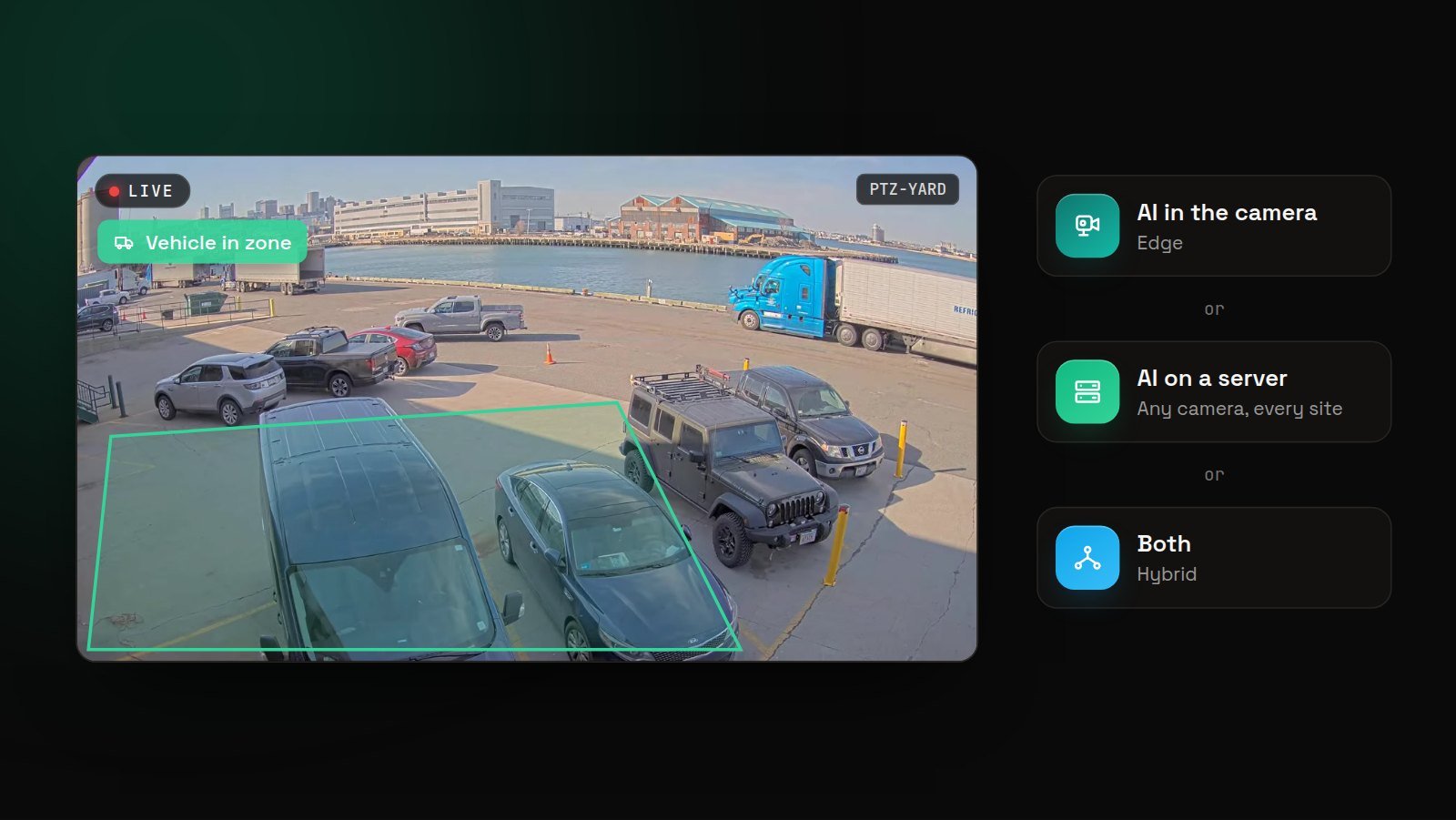
An AI camera has a small processor for neural networks next to its image sensor. It runs detection models on its own video and sends events — "person crossed the line", "vehicle in zone" — to the recorder along with the video.
Typical built-in functions are intrusion and line-crossing detection, telling people from vehicles (which cuts false alarms from animals, shadows and rain), face detection, and on some models people counting or number plate reading.
What's good: no extra server, events available right at the camera, low network load if only events are sent, and simple setup on small sites.
What's limited: the processor is small, so the models are smaller and the list of detections is fixed by the manufacturer. Each camera is configured separately, features vary between models and brands, and adding a new kind of detection usually means buying new cameras.
What is AI video analytics software?
AI video analytics software runs on a server — on-premise or in the cloud — and analyses streams from ordinary IP cameras. The cameras just send video; a GPU in the server does the analysis.
What's good:
- Works with existing cameras. Any camera with an RTSP or ONVIF stream, any brand, any age within reason.
- Bigger, better models. A server GPU can run more accurate models and detections that cameras can't: PPE compliance, fire and smoke, fall detection, loitering, ANPR, multi-camera tracking and more.
- One place to manage. Rules, schedules, alerts and model updates set once for all cameras and sites.
- Search across everything. Detections from every camera land in one index, so you can search footage by object, plate or description.
- New detections without new hardware. Add an application in software when the business needs it.
What's limited: you need a server with a GPU (or a cloud subscription) and enough network capacity to bring streams to it.
Side by side
| AI camera (edge) | AI software (server) | |
|---|---|---|
| Uses existing cameras | No, needs new cameras | Yes |
| Detections | Fixed set per model | Wide and growing |
| Model size and accuracy | Limited by the camera's chip | Larger models on GPUs |
| Mixed camera brands | Features differ per brand | Same features on every camera |
| Management | Camera by camera | Central, all sites |
| Search across cameras | Usually per camera or per NVR | Across every camera and site |
| Extra hardware | None | Server with GPU, or cloud |
| Network load | Low if only events are sent | Streams must reach the server |
| Best fit | Small new sites, simple perimeter rules | Existing cameras, many sites, advanced AI |
How much hardware does AI software need?
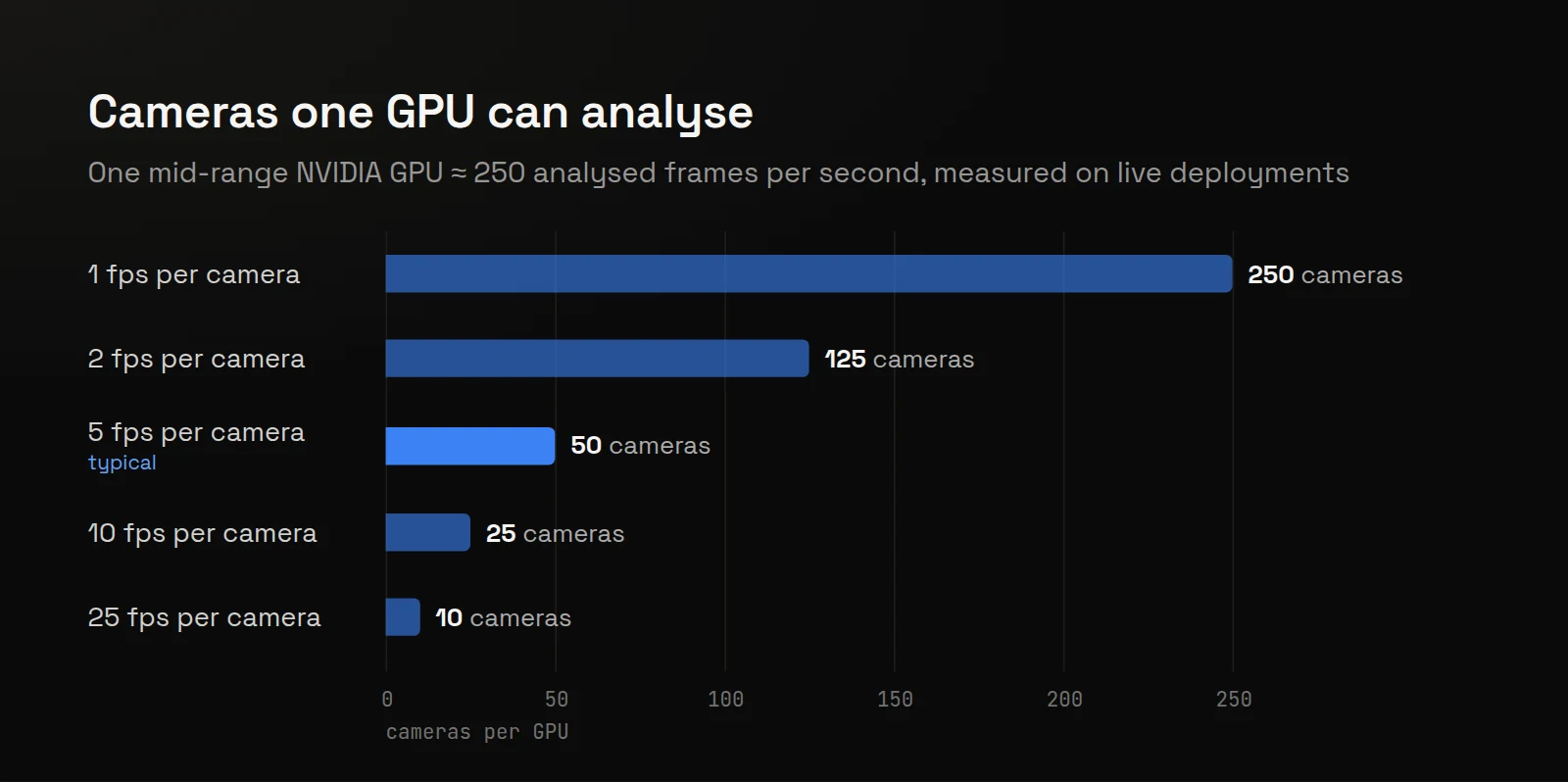
Less than most people expect, because most detections don't need every frame. People, vehicles, PPE and smoke change slowly compared with a camera's 25 frames per second, so analysing five frames per second per camera is usually enough. Fast events, such as ANPR on moving traffic, need more.
On our own deployments, one mid-range NVIDIA GPU (RTX A4000 or RTX 5070 Ti class) analyses about 250 frames per second in total. That makes the arithmetic simple:
Cameras per GPU = 250 ÷ frames analysed per second per camera
| Frames analysed per camera | Cameras per GPU |
|---|---|
| 1 fps (slow scenes, counting) | about 250 |
| 2 fps | about 125 |
| 5 fps (typical) | about 50 |
| 10 fps (fast movement) | about 25 |
| 25 fps (every frame) | about 10 |
Without a GPU, analytics can run on the CPU, but it's expensive in cores: we measure about 1.5 CPU threads per analysed camera. That's fine for a handful of cameras and impractical for fifty. Our free hardware sizing calculator works out GPUs, CPU, RAM and storage for any mix of cameras.
Note These figures are for one AI application per camera. Running several on the same camera — for example PPE and fall detection — adds load; your vendor should size for the actual mix.
When to choose which
Choose AI cameras when:
- you're installing a new, small site anyway;
- you need only simple rules such as perimeter intrusion or line crossing;
- there's no room for a server and the network to the site is weak.
Choose AI software when:
- you already have cameras that work — replacing them all is the biggest cost in any AI project;
- you have several sites and want them managed and searched in one place;
- you need detections beyond the basics, or expect to add more later;
- you want to avoid being tied to one camera brand.
Use both when a remote site has a weak uplink: AI cameras filter events locally, and only those events and short clips travel to the central system.
How to start
Don't start with hardware. Start with one problem — missing helmets in a plant, trucks waiting too long at docks, intrusions at night — and two or three cameras that already see it. Run AI software on those for a few weeks, count the true and false alerts, and expand once the numbers are right. Our guide What is AI video analytics? explains the technology in more depth, and conventional CCTV monitoring vs AI video analytics shows what changes for the control room.
Arthbot runs AI video analytics on the cameras you already have, centrally in Arthview™ VMS, with 40 AI applications for safety, security, traffic and operations. Book a demo with a few minutes of your own footage.
Frequently asked questions
What is the difference between an AI camera and a normal CCTV camera?
An AI camera has a built-in processor that runs detection models on its own video, so it can tell people from vehicles and raise events such as line crossing. A normal CCTV camera only sends video; AI can still be added by running analytics software on a server.
Can I add AI to my existing CCTV cameras?
Yes. AI video analytics software analyses the video stream from existing IP cameras, so you don't need to replace them. Most cameras that provide an RTSP or ONVIF stream can be used.
Is edge AI better than server AI?
Neither is better everywhere. Edge AI suits small new sites with simple rules and weak networks. Server AI suits existing cameras, many sites, advanced detections and central management. Many organisations combine them.
How many cameras can one GPU handle for video analytics?
On our deployments, one mid-range NVIDIA GPU analyses about 250 frames per second, which is about 50 cameras at five frames per second each. At one frame per second it's about 250 cameras; at every frame (25 fps) about 10.
Do AI cameras need a special NVR or VMS?
To use their events, the recorder or VMS has to understand them, usually through ONVIF or the manufacturer's integration. Check that your recording system supports the analytics events of the camera models you plan to buy.
- AI CCTV
- edge AI
- video analytics
- GPU
- hardware sizing
See it on your own cameras
Send us a few minutes of your footage and we'll show you what Arthbot finds in it.