Blog6 min read
How to calculate PoE budget for CCTV cameras
PoE standards and classes, the PoE budget formula with a worked example, how to choose a PoE switch for CCTV, and the mistakes that leave cameras dark at night.

Arthbot team
Arthbot Systems, Haridwar
On this page
Power over Ethernet (PoE) lets one network cable carry both video and power to a camera. It saves a power point at every camera — and causes a classic problem: a system that works perfectly on handover day and loses cameras at night, when every infrared light switches on at once.
Quick answer PoE budget is the total power a switch can deliver to all its PoE ports at once. To size it, add up each camera's maximum power from its datasheet (with IR and heaters on), add 20% headroom, and choose a switch whose PoE budget is at least that. Also check that each port's PoE standard covers its camera — 802.3af (up to 12.95 W at the camera) for most fixed cameras, 802.3at PoE+ (25.5 W) for PTZs and cameras with heaters, 802.3bt (51–71.3 W) for high-power PTZs.
PoE standards at a glance
| Standard | Type | Power from switch port | Guaranteed at camera | Typical CCTV use |
|---|---|---|---|---|
| IEEE 802.3af (PoE) | Type 1 | 15.4 W | 12.95 W | Fixed domes and bullets |
| IEEE 802.3at (PoE+) | Type 2 | 30 W | 25.5 W | Small PTZs, cameras with heaters, multi-sensor |
| IEEE 802.3bt | Type 3 | 60 W | 51 W | Outdoor PTZs with IR and heaters |
| IEEE 802.3bt | Type 4 | 90 W | 71.3 W | High-power PTZs, special devices |
The difference between the switch and camera figures is what's lost in up to 100 m of cable. Always compare the camera's consumption with the "guaranteed at camera" figure.
The PoE budget formula
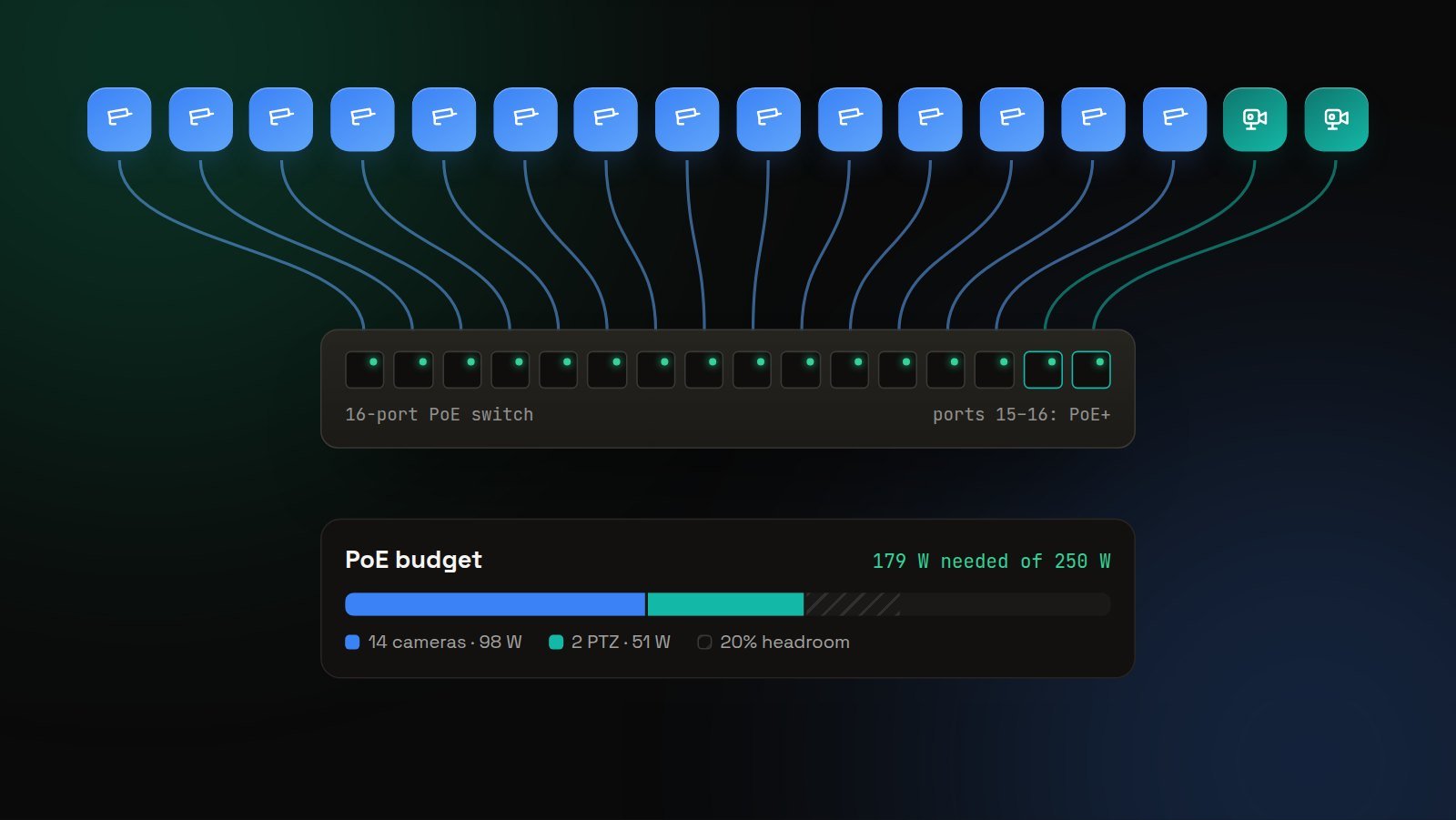
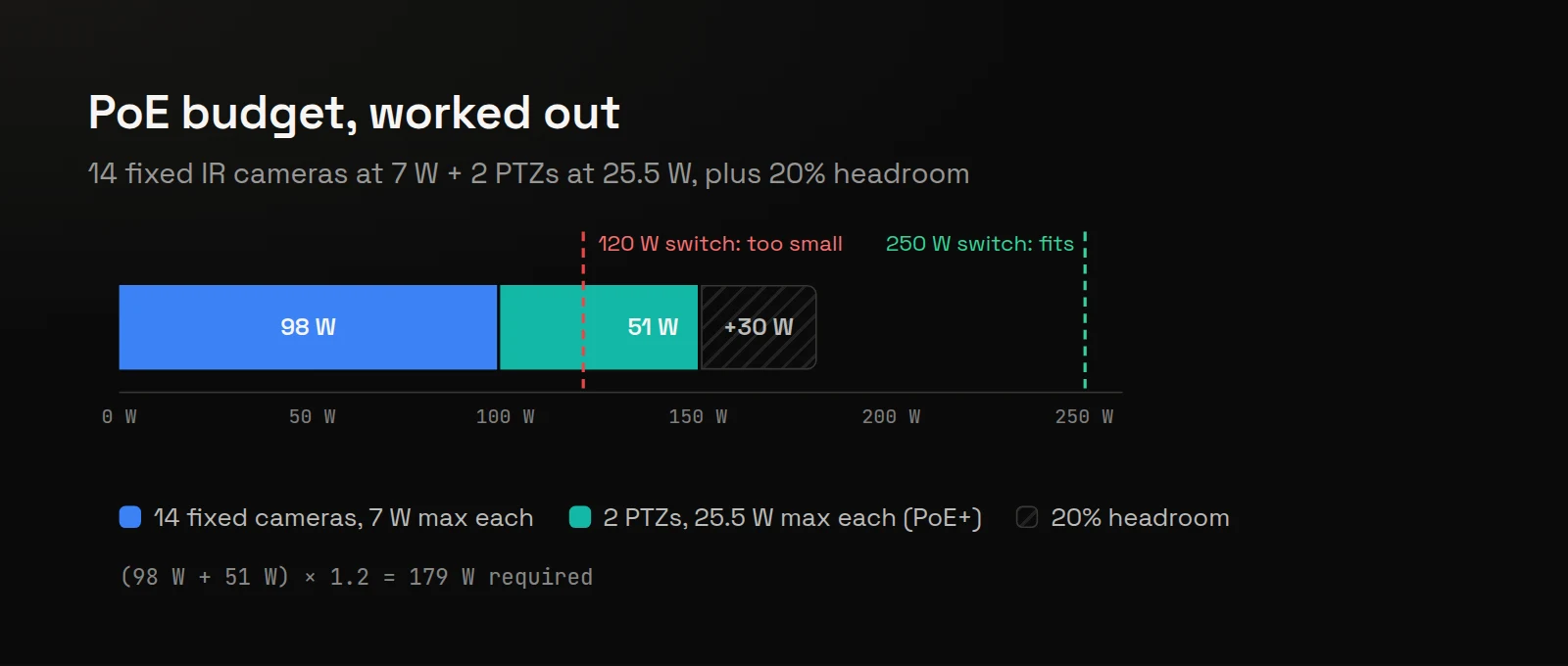
Required PoE budget = (sum of each camera's maximum power) × 1.2
Use the maximum power from the camera datasheet, not the typical figure. Maximum includes infrared LEDs at full power, heaters and wipers, and PTZ motors moving — which is exactly what happens on a cold, dark night.
Worked example 14 fixed IR bullets at 7 W maximum = 98 W. 2 outdoor PTZs at 25.5 W maximum (PoE+) = 51 W. Total 149 W × 1.2 = 179 W required. A 16-port switch with a 120 W PoE budget looks right on port count but will drop cameras at night. Choose one with at least 180 W — a 250 W model leaves room for two or three more cameras — and make sure the two PTZ ports are PoE+.
Port by port: the second check
The total budget isn't the only limit. Each port also has a maximum set by its PoE standard:
- An 802.3af port can't power a camera that needs 20 W, even if the switch has budget to spare.
- Many switches have only some PoE+ or 802.3bt ports. Put PTZs and heated cameras on those.
- Some switches reserve power by class: a camera that announces itself as Class 3 or Class 0 gets about 15.4 W reserved even if it draws 6 W. On those switches, plan with the class values, not measured draw — or change the switch to allocate by actual consumption if it supports it.
Choosing a PoE switch for CCTV
| Check | Why |
|---|---|
| PoE budget ≥ your requirement | The total limit — the most common mistake |
| Enough PoE+ / 802.3bt ports | For PTZs and heated cameras |
| Gigabit uplink, ideally fibre | 16 cameras at 4 Mbps each is only 64 Mbps, but uplinks also carry playback and exports |
| Managed or "smart" | VLANs to separate cameras, power-cycle a stuck camera remotely, see per-port power |
| Industrial temperature rating | For outdoor cabinets and hot plant rooms |
| UPS sized for switch + PoE load | When the power goes, cameras go too |
For network bandwidth, storage and servers, use our hardware sizing calculator — it does the bitrate maths for every camera and link.
Common PoE mistakes
- Sizing on typical power. Cameras draw most at night with IR on. Size on maximum.
- Counting ports, not watts. "16 PoE ports" says nothing about whether all 16 can be powered at once.
- Forgetting the UPS. A UPS must carry the switch's own consumption plus the full PoE load, for the backup time you need.
- Cable over 100 m. Ethernet and PoE are specified to 100 m. Beyond that, use a PoE extender or fibre with a local switch.
- Cheap cable. Copper-clad aluminium (CCA) cable has higher resistance, so cameras at the end of long runs get less power. Use solid copper Cat 6.
- Passive PoE. Some cheap injectors send fixed voltage without negotiation and can damage standard cameras. Stick to IEEE 802.3af/at/bt.
Integrators: designing AI-ready systems
AI video analytics doesn't change the PoE maths — cameras draw the same power whether a server analyses their video or not — but it changes what the network must carry to the server, and what the server must do. Arthbot's video ingestion connects cameras and NVRs over RTSP, RTSPS, ONVIF and GigE Vision, and one mid-range GPU analyses around 50 cameras at five frames per second. Read ONVIF vs RTSP and DORI and pixels per metre for the rest of the design, or talk to us about partnering on a project.
Frequently asked questions
What is PoE budget?
PoE budget is the total power, in watts, that a switch can deliver across all its PoE ports at the same time. Every powered camera draws from this shared budget.
How do you calculate PoE budget for CCTV?
Add up the maximum power consumption of every camera from its datasheet, including infrared and heaters, then add about 20% headroom. Choose a switch whose PoE budget is at least that figure, and check each port supports its camera's PoE standard.
How many watts does a CCTV camera use?
It varies widely. Fixed domes and bullets typically use a few watts to around 12 W at maximum with IR on; PTZ cameras with IR, heaters and motors can need 25 W to over 60 W. Always use the maximum figure from the datasheet.
What is the difference between PoE and PoE+?
PoE (IEEE 802.3af) delivers up to 15.4 W per port, with 12.95 W guaranteed at the device. PoE+ (IEEE 802.3at) delivers up to 30 W per port, with 25.5 W at the device, for PTZs and heated cameras.
Why do my PoE cameras go offline at night?
Usually because the switch's PoE budget is exceeded when infrared lights switch on and every camera draws its maximum power at once. Check total budget and per-port limits against each camera's maximum consumption.
How far can PoE run?
PoE runs up to 100 metres over standard Ethernet cable, the same as the data. For longer distances, use a PoE extender or run fibre to a local PoE switch.
- PoE
- PoE switch
- CCTV design
- system integrators
- network design
See it on your own cameras
Send us a few minutes of your footage and we'll show you what Arthbot finds in it.