Blog7 min read
ONVIF vs RTSP: what integrators need to know
RTSP carries the video; ONVIF finds, configures and controls the camera. How they work together, ONVIF profiles S, T, G and M, and common fixes.

Arthbot team
Arthbot Systems, Haridwar
On this page
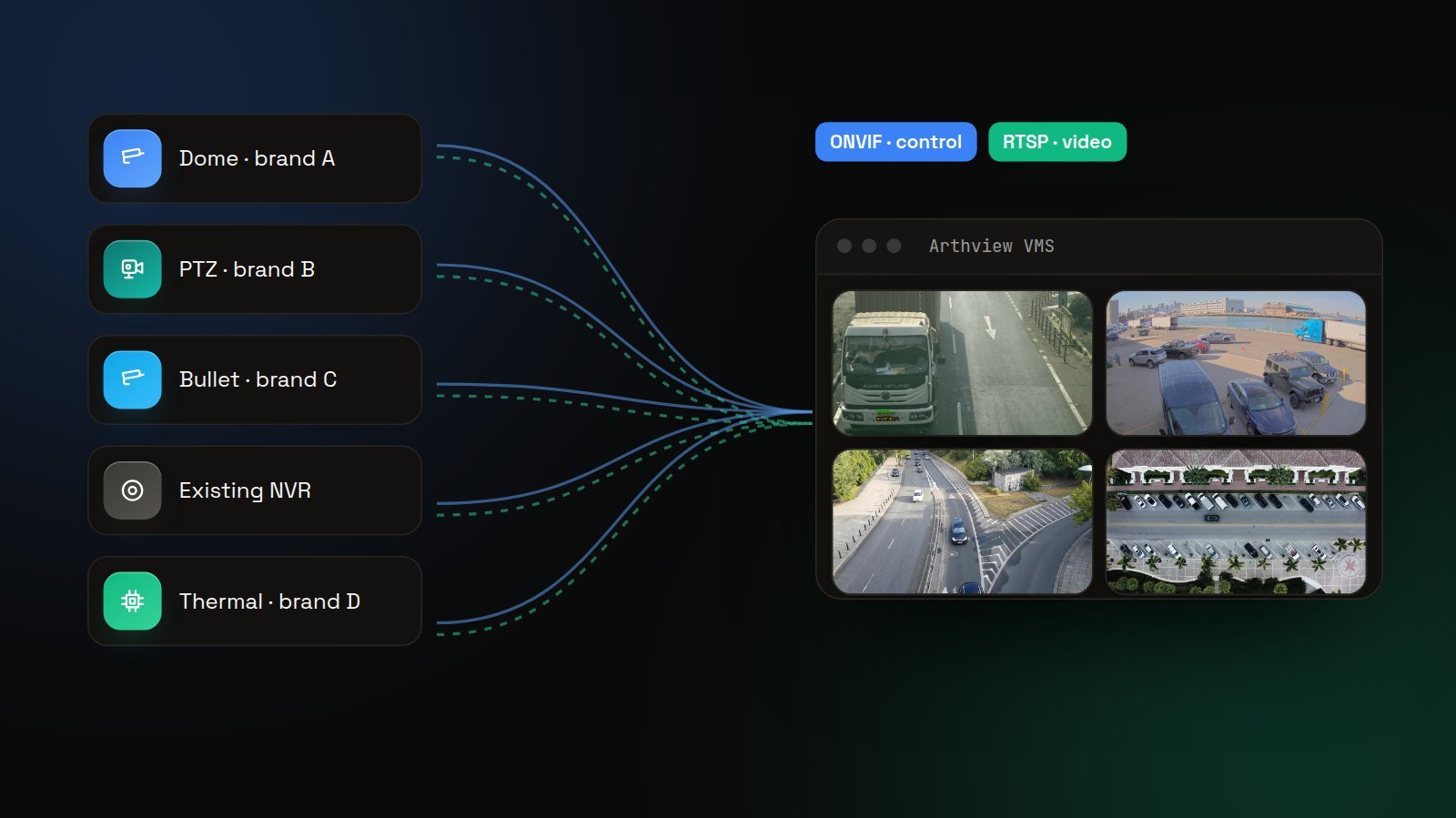
"Is the camera ONVIF?" and "What's the RTSP URL?" are the first two questions in every multi-brand CCTV project. They're often treated as alternatives. They aren't: they do different jobs, and most integrations use both.
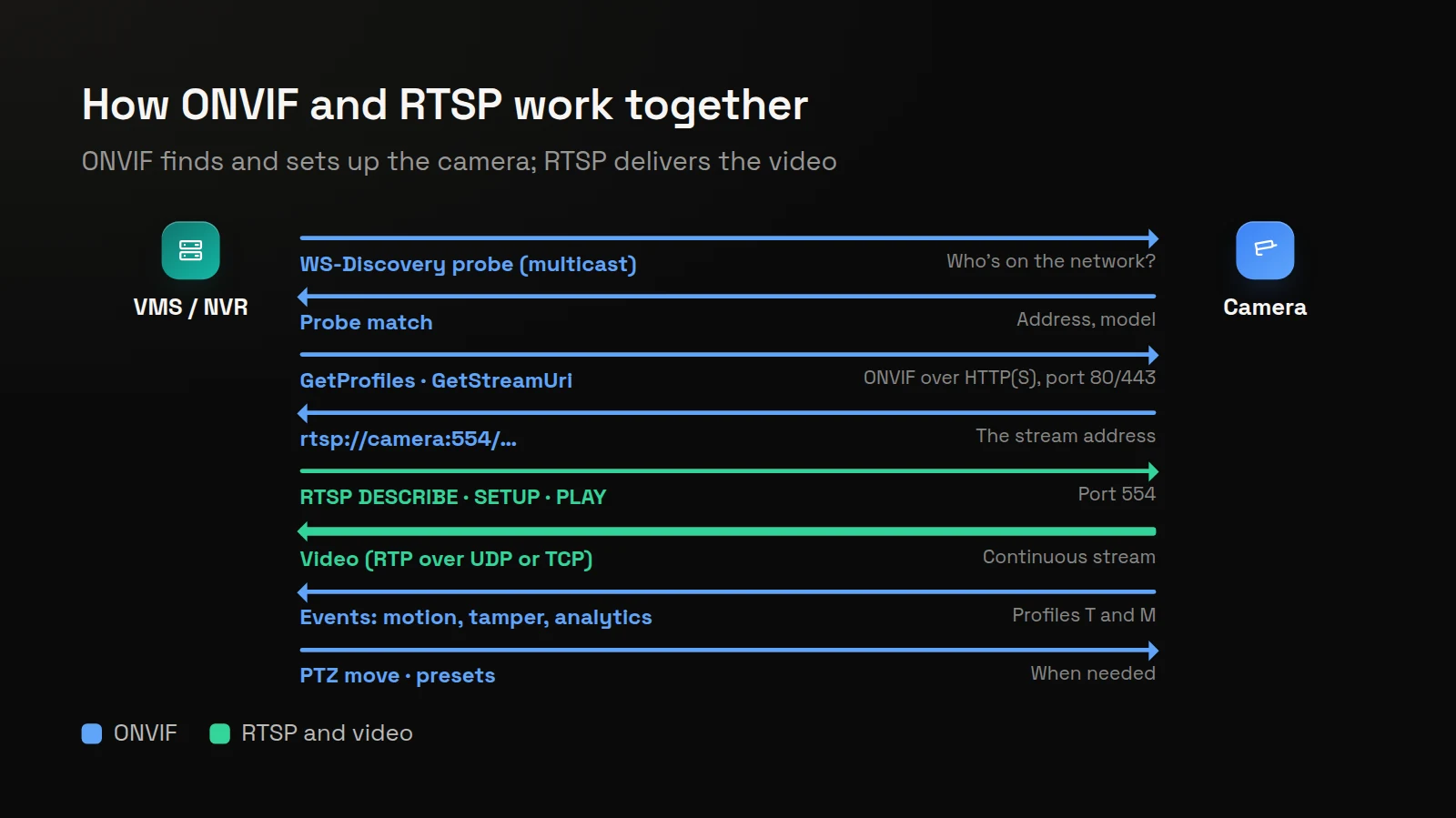
Quick answer RTSP (Real Time Streaming Protocol) is how video is streamed from a camera: a client asks for a stream at a URL and receives the video. ONVIF is an industry interoperability standard for finding, configuring and controlling cameras from any maker — discovery, stream settings, PTZ, events and more. ONVIF uses RTSP to deliver the video itself. Use RTSP alone when you only need the picture; use ONVIF when you also need control, events and easy setup across brands.
What is RTSP?
RTSP is an internet standard for controlling media streams. A client — a VMS, NVR or video player — connects to the camera, usually on port 554, and asks to play a stream at a URL such as:
rtsp://username:password@192.168.1.64:554/<stream path>
The stream path is vendor-specific: every manufacturer uses its own format for the main stream, sub-stream and channel number, which is why integrators keep a list of RTSP URL formats. The video itself travels as RTP packets, over UDP or interleaved in the RTSP TCP connection. RTSPS is the same with TLS encryption.
RTSP gives you: the video and audio. It doesn't give you: discovery, settings, PTZ control, motion or analytics events, or any guarantee that two brands behave the same way.
What is ONVIF?
ONVIF is an open industry forum that publishes interface specifications so that IP cameras, recorders and VMS software from different manufacturers can work together. An ONVIF client talks to the camera over HTTP using web services to:
- discover cameras on the local network (WS-Discovery);
- read device information and capabilities;
- configure video streams — codec, resolution, frame rate, bitrate;
- ask the camera for its RTSP stream URL (so you don't need the vendor format);
- control PTZ and presets;
- receive events — motion, tamper, inputs and analytics;
- search and play back recordings stored on the camera (with Profile G).
ONVIF profiles
ONVIF groups features into profiles. A product is "ONVIF conformant" only for the profiles it has passed.
| Profile | Covers | Notes |
|---|---|---|
| S | Basic video streaming and configuration, PTZ | Being retired: ONVIF recommends Profile T, and the June 2026 test tools are the last that allow new Profile S conformance |
| T | Advanced streaming: H.264 and H.265, imaging, motion and tamper events, metadata | The baseline for new projects |
| G | Recording on the camera's edge storage, search and playback | Useful for SD-card backup and recovery after network outages |
| M | Metadata and events from analytics: object classification, counting, faces, plates | For bringing camera analytics into a VMS |
| A, C, D | Access control: configuration, doors and credentials, peripherals | For access-control systems |
Two practical consequences: H.265 streaming is a Profile T feature, so a Profile S-only device may need H.264 for full interoperability; and ONVIF's announcement retiring Profile S means new specifications should ask for Profile T.
How to check a camera's ONVIF profile
- Search the official ONVIF conformant products list by manufacturer and model. Only listed products are actually conformant.
- Check the datasheet for the profiles named — "ONVIF compatible" without a profile is not the same thing.
- Test with your VMS or a free ONVIF tool before committing a whole project to a camera model.
ONVIF vs RTSP at a glance
| RTSP | ONVIF | |
|---|---|---|
| What it is | Streaming protocol | Interoperability standard |
| Carries video | Yes | No — it sets up RTSP for that |
| Finds cameras on the network | No | Yes (WS-Discovery) |
| Configures streams | No | Yes |
| PTZ control | No | Yes |
| Events and analytics metadata | No | Yes (Profiles T and M) |
| Same across brands | Partly — URL formats differ | Yes, for conformant profiles |
| Default port | 554 | 80 or 443 (HTTP/HTTPS), plus RTSP 554 for video |
Fixing common connection problems
| Symptom | Likely cause | Fix |
|---|---|---|
| Camera not found by discovery | Discovery uses multicast and doesn't cross VLANs or subnets | Add the camera by IP address, or run discovery in the camera's VLAN |
| ONVIF login fails with the right password | ONVIF disabled, or a separate ONVIF user needed | Enable ONVIF and create an ONVIF user in the camera's web page |
| Login fails intermittently | Camera clock is off — ONVIF authentication is time-sensitive | Point the camera and server to the same NTP server |
| Video works, PTZ doesn't | PTZ not exposed over ONVIF, or wrong profile | Check Profile S/T PTZ support; update firmware |
| H.265 stream not offered | Device only conformant to Profile S | Use H.264, or a Profile T device |
| Stream drops or smears | UDP packet loss on a busy network | Switch the client to RTSP over TCP |
| Wrong stream (sub instead of main) | Profile or stream token mix-up | Select the main-stream profile explicitly in the VMS |
Security basics
- Change every default password and use a dedicated, least-privilege ONVIF user for the VMS.
- Put cameras on their own VLAN, with no direct internet access.
- Prefer HTTPS for ONVIF and RTSPS where the camera supports it.
- Keep firmware current — and remember Profile S was retired partly because of its older authentication.
How Arthbot connects cameras
Arthbot's video ingestion connects IP, PTZ, thermal, drone and machine-vision cameras — and existing NVRs — over RTSP, RTSPS, ONVIF and GigE Vision, so mixed-brand estates can be recorded, streamed and analysed in Arthview™ VMS without replacing hardware. For the rest of the design, read how to calculate PoE budget, DORI and pixels per metre and VMS vs NVR vs DVR. Integrators: talk to us about partnering.
Frequently asked questions
What is the difference between ONVIF and RTSP?
RTSP is a protocol for streaming video from a camera. ONVIF is an interoperability standard for discovering, configuring and controlling cameras from different manufacturers; it uses RTSP to deliver the video.
Do I need ONVIF if the camera supports RTSP?
Not if you only need the video. ONVIF adds discovery, stream configuration, PTZ control and events, and avoids vendor-specific RTSP URLs, so it's worth using in multi-brand systems.
What is ONVIF Profile T?
Profile T is ONVIF's profile for advanced video streaming, including H.264 and H.265, imaging settings, motion and tamper events and metadata. ONVIF recommends it as the successor to Profile S.
Is ONVIF Profile S still supported?
ONVIF announced in October 2025 that it is ending support for Profile S and recommends Profile T instead. Installed Profile S devices keep working, but new products and specifications should use Profile T.
What port does RTSP use?
RTSP uses port 554 by default. ONVIF's web services usually use port 80 (HTTP) or 443 (HTTPS), with the video delivered over RTSP.
How do I check if a camera is ONVIF conformant?
Look the model up in the official ONVIF conformant products list on onvif.org, and check which profiles it passed. A datasheet that says "ONVIF compatible" without naming a profile isn't proof of conformance.
- ONVIF
- RTSP
- camera integration
- system integrators
- VMS
See it on your own cameras
Send us a few minutes of your footage and we'll show you what Arthbot finds in it.