Blog9 min read
How to calculate CCTV storage (formula + free calculator)
The CCTV storage formula, worked examples for 2 MP to 4K cameras, H.264 vs H.265, motion recording and RAID, with numbers measured on live systems.

Arthbot team
Arthbot Systems, Haridwar
On this page
- The CCTV storage formula
- Step 1: find each camera's bitrate
- Step 2: H.264 or H.265?
- Step 3: frame rate
- Step 4: continuous or motion recording
- Step 5: how many days to keep
- Step 6: from terabytes to real disks
- How many days will my hard disk record?
- Don't forget bandwidth
- Size it in one minute
- Frequently asked questions
CCTV storage is easy to calculate once you know one number: the bitrate each camera actually sends. Everything else — resolution, codec, frame rate, motion recording and how many days you keep — changes that bitrate or multiplies it.
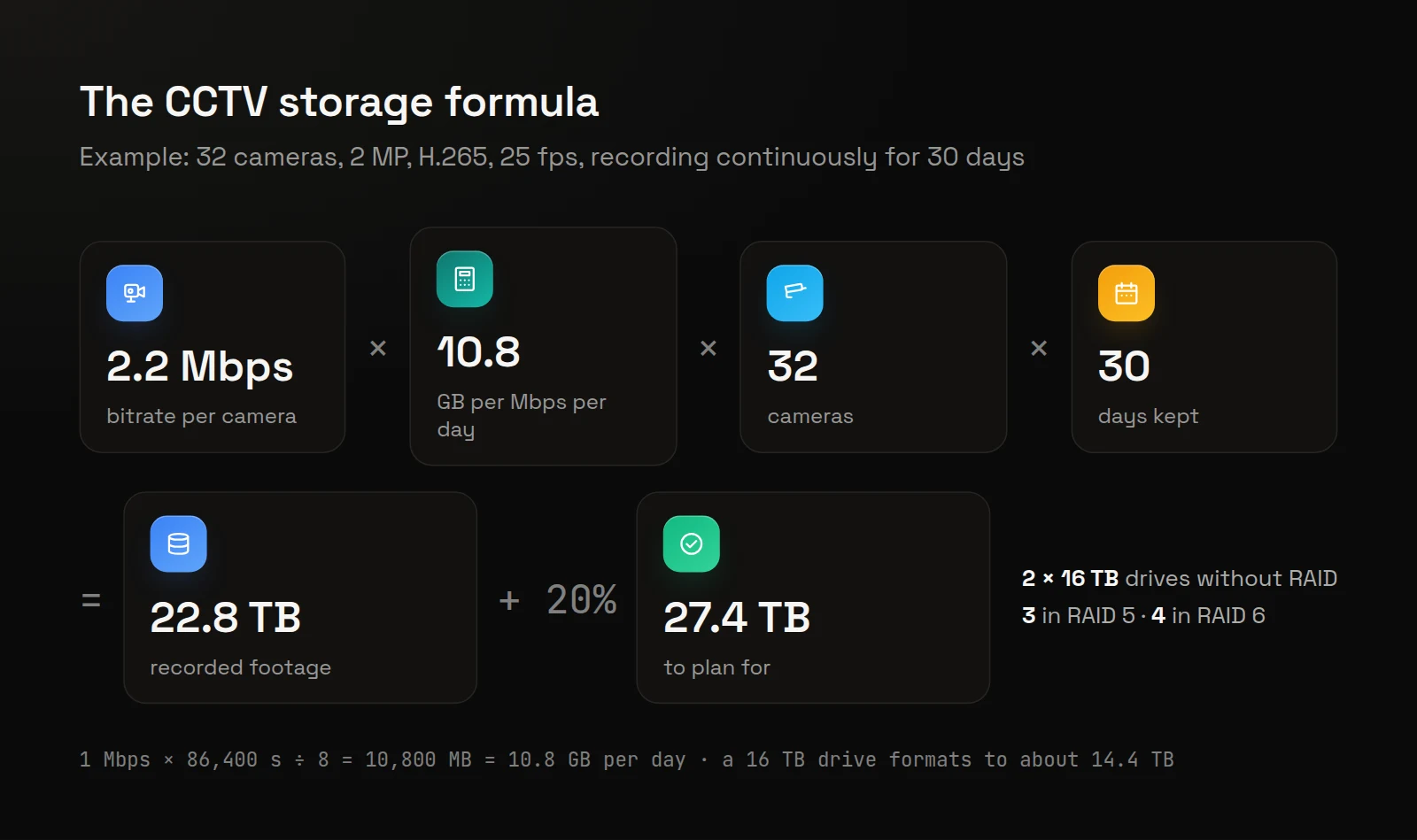
Quick answer Storage per day (GB) = bitrate (Mbps) × 10.8. Multiply by the number of cameras and the days you keep footage, then add 20% headroom. A 2 MP camera on H.265 averages about 2.2 Mbps, so it needs about 24 GB a day, or 713 GB for 30 days. Thirty-two of them need about 22.8 TB for 30 days, or 27.4 TB with headroom.
The CCTV storage formula
Every recorder, from a four-channel NVR to an enterprise VMS, writes the camera's video stream to disk as it arrives. So storage is simply data rate × time:
GB per day  = bitrate in Mbps × 10.8
Total GB    = GB per day × cameras × days × share of time recorded
Plan for    = Total GB × 1.2   (20% headroom)
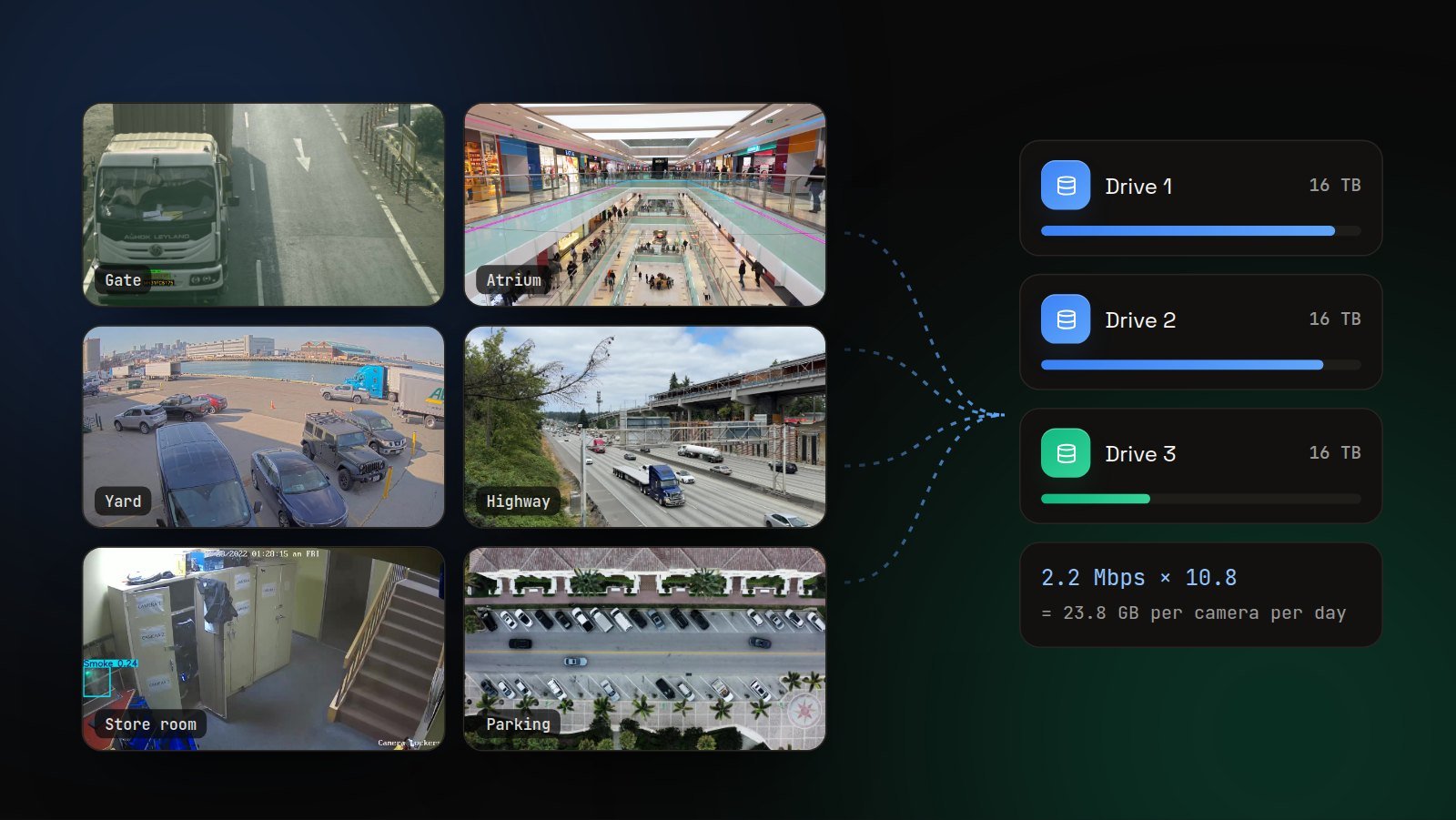
Where 10.8 comes from: 1 Mbps for 24 hours is 1 × 86,400 seconds = 86,400 megabits. Divide by 8 to get 10,800 megabytes, or 10.8 GB. On our own deployments this matches what the disks actually record, so it's the only conversion you need.
The 20% headroom is there because bitrates are averages. Rain, night-time noise, a busy day or a camera someone re-angles all push bitrate up, and a disk that's 100% full on paper ends up a few days short in practice.
Step 1: find each camera's bitrate
Bitrate depends on resolution, codec, frame rate, the camera's quality setting and — more than most people expect — the scene. A quiet corridor compresses far better than a busy road with moving trees.
The best source is your own system: most NVRs and every VMS show the live bitrate per camera. If you're planning a new site, start from these typical H.265 figures at 25 fps, measured on live Arthbot deployments (2 MP and 4 MP) and scaled for the other resolutions:
| Camera | Typical H.265 bitrate | Per day | 30 days | 90 days |
|---|---|---|---|---|
| 1 MP (720p) | 1.2 Mbps | 13 GB | 389 GB | 1.2 TB |
| 2 MP (1080p) | 2.2 Mbps | 24 GB | 713 GB | 2.1 TB |
| 4 MP (1440p) | 3.5 Mbps | 38 GB | 1.1 TB | 3.4 TB |
| 5 MP | 4.2 Mbps | 45 GB | 1.4 TB | 4.1 TB |
| 8 MP (4K) | 6.4 Mbps | 69 GB | 2.1 TB | 6.2 TB |
Across 30 live 2 MP cameras we measured an average of 2.17 Mbps, but individual cameras ranged from 0.2 Mbps (a still, dark storeroom) to 6.4 Mbps (a busy, high-detail scene). That spread is why per-camera figures from a real system beat any table, including this one.
Tip Camera datasheets list the maximum bitrate, not the average. Sizing from the datasheet usually over-buys storage by two to three times.
Step 2: H.264 or H.265?
H.265 (HEVC) was designed to deliver the same picture quality at a lower bitrate than H.264. Independent testing by the US NTIA found that H.265 matches H.264 quality at about half the bitrate in many — but not all — scenes. For surveillance sizing we use H.264 ≈ 1.8 × H.265.
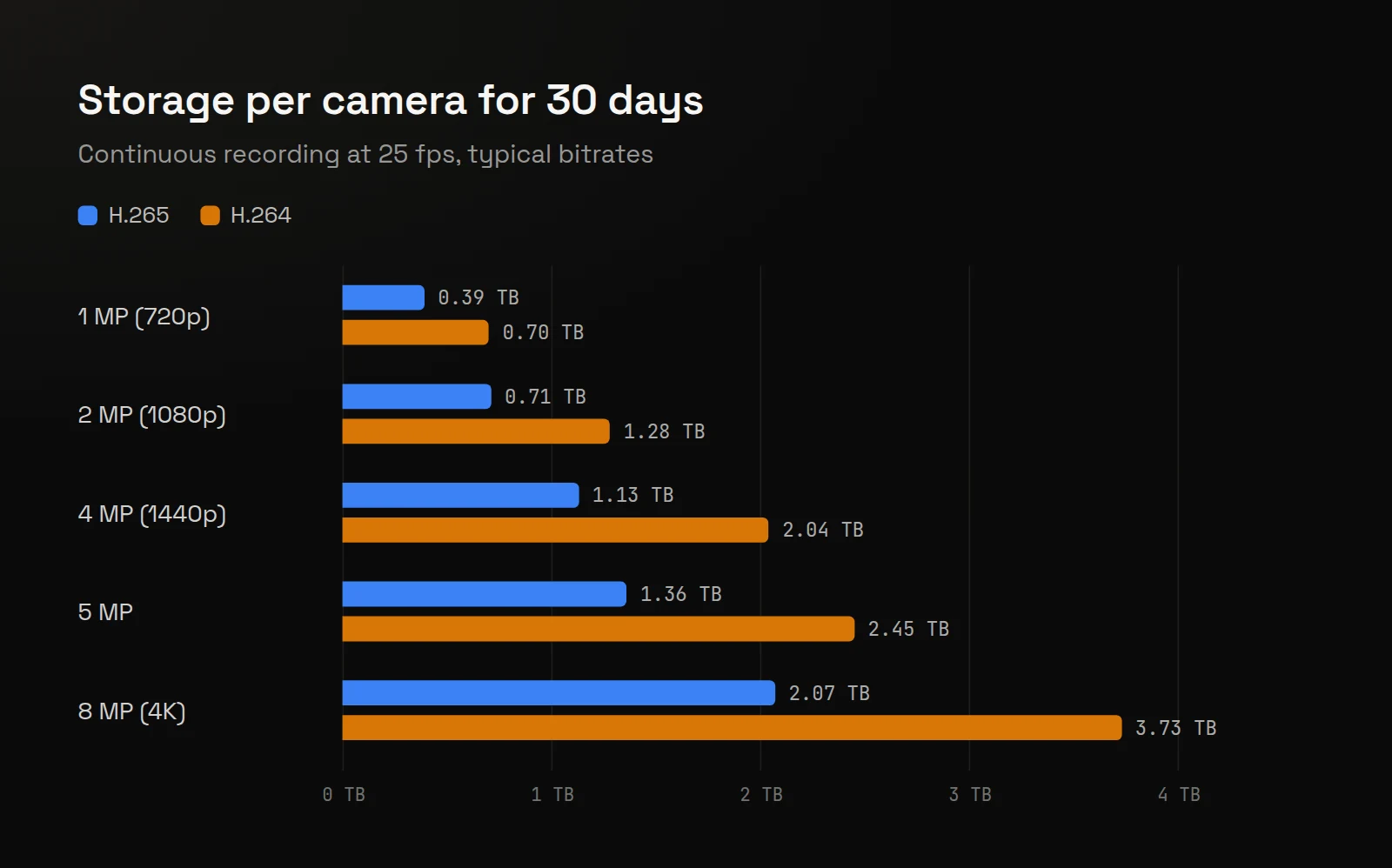
"Smart" codecs (sold as H.265+, H.264+, Zipstream and similar) go further by lowering quality in parts of the picture that don't change. They can cut another 30–50% on static scenes, but the saving disappears when the scene is busy — so size busy cameras at their plain H.265 rate.
If your cameras support H.265, use it. The exception is when an old recorder or viewing client can't decode it; then the extra disk is the price of compatibility.
Step 3: frame rate
Bitrate scales roughly in line with frame rate. On our deployments, a 1080p camera at 16 fps averaged about 1.5 Mbps against 2.2 Mbps at 25 fps. For most security cameras 12–15 fps is plenty for recording; fast scenes such as ANPR lanes and production lines are the exceptions.
Step 4: continuous or motion recording
Recording only when something moves can save a great deal of disk. How much depends entirely on how often the scene is busy. Here is what we measured, as a share of the storage continuous recording would use:
| Scene | Still recorded | Saving |
|---|---|---|
| Busy road or yard | 40% | 60% |
| Entrance or corridor | 5% | 95% |
| Quiet office | 2% | 98% |
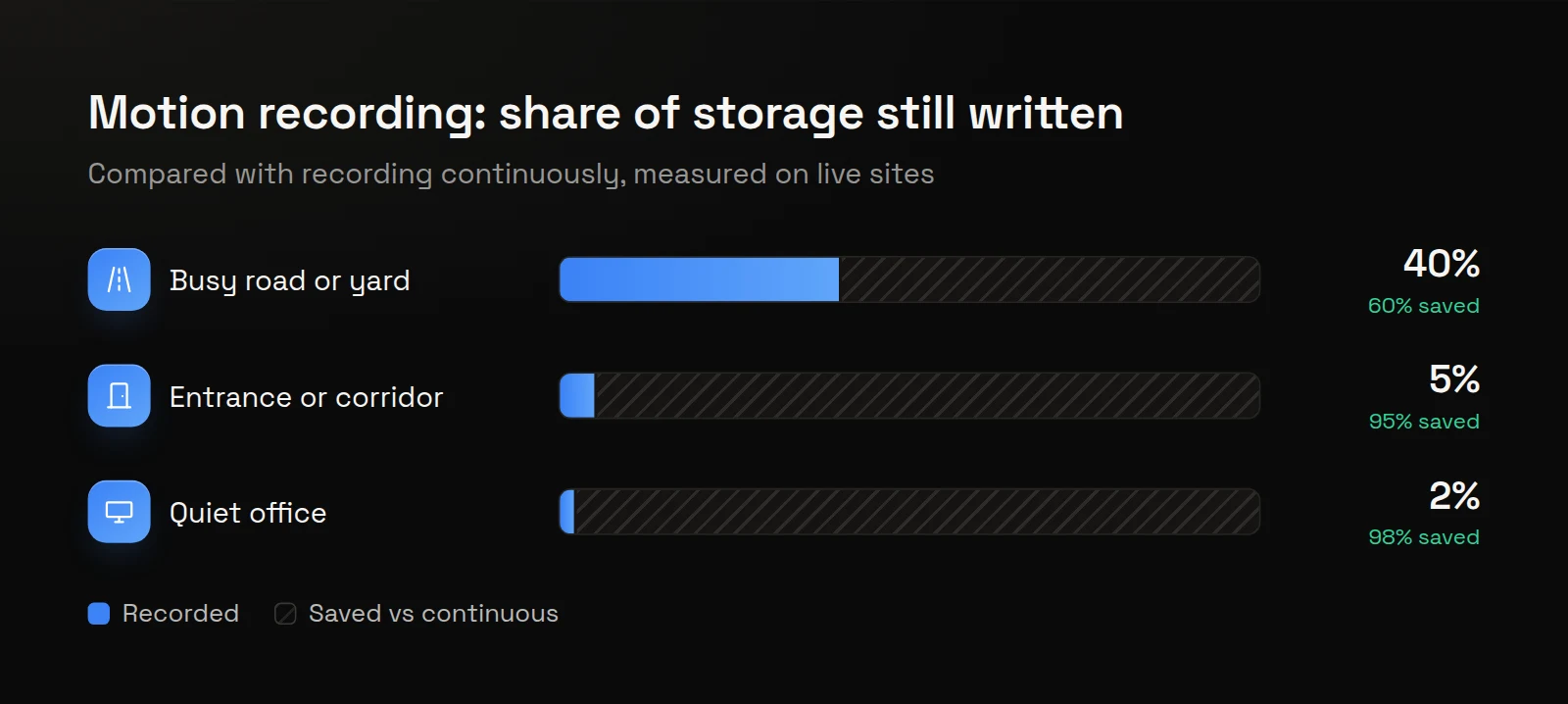
Note Motion recording has two costs. Night-time sensor noise, rain, insects and moving shadows trigger recording, so real savings are often lower than the figures above. And anything the motion detector misses is simply not recorded. For perimeters, cash areas and anywhere you may need evidence, record continuously.
Step 5: how many days to keep
There is no single legal retention period for CCTV in India. Your sector, insurer or customer contracts may set one, and the Digital Personal Data Protection Act expects personal data — which includes identifiable footage — to be kept no longer than needed. Most commercial sites settle on 30 days; banks, highways and critical sites often keep 60–90 days for selected cameras.
You don't have to keep every camera for the same time. Keeping entrances and gates for 90 days and everything else for 30 is a common way to save disk without losing what matters.
Step 6: from terabytes to real disks
Two practical corrections turn the number into a shopping list:
- Usable capacity is about 90% of the label. A "16 TB" drive formats to about 14.4 TB, because drive makers count in decimal terabytes and the file system needs some space.
- RAID costs drives. RAID 5 gives up one drive's capacity per array for protection, RAID 6 gives up two, and RAID 1 and RAID 10 give up half.
There's also a performance limit: when several people play back footage while the system records, a single 7,200 rpm surveillance drive starts to struggle. On our systems we plan for no more than about 25 cameras per drive.
Worked example 32 × 2 MP cameras, H.265, 25 fps, recording continuously for 30 days. 32 × 2.2 Mbps × 10.8 × 30 days = 22.8 TB. With 20% headroom: 27.4 TB. With 16 TB drives (14.4 TB usable each): 2 drives without RAID (16 cameras per drive), 3 drives in RAID 5 or 4 drives in RAID 6.
How many days will my hard disk record?
Turned around, the same formula tells you how long an existing recorder will keep footage. For 2 MP cameras on H.265 at 25 fps, recording continuously:
| Disk | 4 cameras | 8 cameras | 16 cameras |
|---|---|---|---|
| 1 TB | 9 days | 4 days | 2 days |
| 2 TB | 18 days | 9 days | 4 days |
| 4 TB | 37 days | 18 days | 9 days |
| 8 TB | 75 days | 37 days | 18 days |
| 16 TB | 151 days | 75 days | 37 days |
For 4 MP cameras divide the days by about 1.6; for H.264 divide by about 1.8.
Don't forget bandwidth
If cameras at remote sites record to a central server, the uplink must carry every camera's stream all the time. Add about 10% for protocol and VPN overhead, plus the same 20% headroom:
Uplink Mbps = sum of camera bitrates × 1.1 × 1.2
The 32 cameras above need about 93 Mbps of sustained upload to record centrally. If that's not available, record at the site and stream only what's being watched. Live viewing over the internet should use sub-streams: about 1.2 Mbps for a 720p tile and 0.45 Mbps for a small grid tile, so a 16-camera remote grid needs around 8 Mbps instead of 35.
Size it in one minute
Our free hardware sizing calculator does all of this for you — storage, drives and RAID, recording servers, GPUs for AI analytics, viewing workstations and bandwidth — using the same measured numbers, with 20% headroom built in. You can share the result as a link or save it as a PDF.
If you're planning a larger system, Arthview™ VMS records, searches and analyses video across sites, and our team will check the sizing against your real cameras. Talk to us.
Frequently asked questions
How much storage does one CCTV camera need for 30 days?
A 2 MP (1080p) camera on H.265 at 25 fps averages about 2.2 Mbps, which is about 24 GB a day or 713 GB for 30 days of continuous recording. On H.264 it's about 1.3 TB. Busy scenes can use two to three times more; quiet scenes much less.
How do you calculate CCTV storage?
Multiply each camera's bitrate in Mbps by 10.8 to get GB per day, then multiply by the number of cameras and the days you keep footage. If you record on motion, multiply by the share of time the scene is active. Add 20% headroom.
How much storage does a 4K camera use per day?
An 8 MP (4K) camera on H.265 at 25 fps typically averages around 6.4 Mbps, or about 69 GB a day. On H.264 expect around 125 GB a day.
What happens when NVR storage is full?
By default, almost every NVR and VMS overwrites the oldest footage first, so recording continues and your retention simply becomes shorter. If overwrite is turned off, recording stops when the disk is full. Either way, set up an alert for disk health and retention so you find out before you need old footage.
Is H.265 really half the size of H.264?
Often, but not always. Independent tests show H.265 reaching H.264's quality at about half the bitrate in many scenes. For surveillance sizing, assuming H.264 needs about 1.8 times the storage of H.265 is a safe middle ground.
Do I need surveillance hard drives?
Yes, for anything beyond a home camera. Surveillance drives are designed and rated for continuous 24/7 writing, which is exactly what a recorder does. Desktop drives are built for intermittent use and tend to fail sooner under constant recording.
- CCTV storage
- NVR
- H.265
- hardware sizing
- video recording
See it on your own cameras
Send us a few minutes of your footage and we'll show you what Arthbot finds in it.